Customer experience is paramount for both your brand and Wolf & Badger. Our team monitors Cancelled Order Rates closely to ensure customers receive their orders reliably. Declined orders should be as close to 0% as possible, and must never exceed 1% at any time.
1. Multiple Shopify Locations
Issue: If your Shopify account uses multiple inventory locations, the W&B dashboard may pull stock from the wrong location or fail to detect accurate stock levels.
Solution:
-
Go to your stock levels and select the location which you would like to fulfil from.
Why this helps: It ensures that stock is correctly synced and available for fulfilment from the location you actively manage.
2. Managing Low Stock Units
Issue: Products with only 1–2 units left are at high risk of overselling or being unavailable when ordered if synced via Shopify.
Solution:
-
Deactivate products which only have 1 unit left
-
If using manual stock management, set aside dedicated stock for W&B to avoid duplicate sales across platforms.
-
Monitor and refresh your inventory frequently or enable automatic sync via Shopify.
Why this helps: It reduces the chance of stock-outs between order time and processing.
3. Incorrect Shopify Stock Levels
Issue: The stock showing on W&B doesn’t match your actual stock due to sync issues or human error.
Solution:
-
Review and fix your stock sync by using this guide:
👉 Troubleshooting Incorrect Shopify Stock Levels -
Run regular stock audits and reconcile discrepancies.
-
If you're ever unsure of your inventory accuracy, deactivate the product with in-nacuracies to avoid any cancelled orders.
Why this helps: Prevents customer disappointment due to avoidable overselling.
4. Made-to-Order (MTO) Stock
Issue: Although we do not allow MTO, we understand that some of our brands with high value products can only function with MTO items listed. However, if there are too many purchasable units this can lead to production overload, delays, or cancellations.
Solution:
-
Only list a low, manageable quantity of purchasable units (e.g., 1–5) to control order volume.
- Ensure that all required materials for production are readily available in your studio.
-
Routinely assess your MTO production capacity and update stock accordingly.
Why this helps: Prevents unmanageable surges in demand that can't be fulfilled on time.
How Stock Deduction Works
Understanding how stock is deducted is essential to prevent sync or overselling issues.
👉 Learn how stock is deducted
If You Must Decline an Order...
You must leave a note in the Decline Order Item pop-up explaining why the item is unavailable. Once an order is declined it will be temporarily deactivated to prevent any additional orders for the same OOS item. If the order relates to a specific variant, the variant will be deactivated and the remaining in-stock SKUs will remain in active.
Once an order has been declined, please take the following next steps:
1. Identify your recently declined orders here
2. If your product is Shopify synced, review this guide to troubleshoot the sync. If the stock is manually managed, then revise stock numbers and update your stock here.
3. To re-activate the product/ variant, go to Products and select the product you wish to update, click 'Edit Product'
4. Go to the size section (see below) and click the edit pen to reactivate the inactive variant.
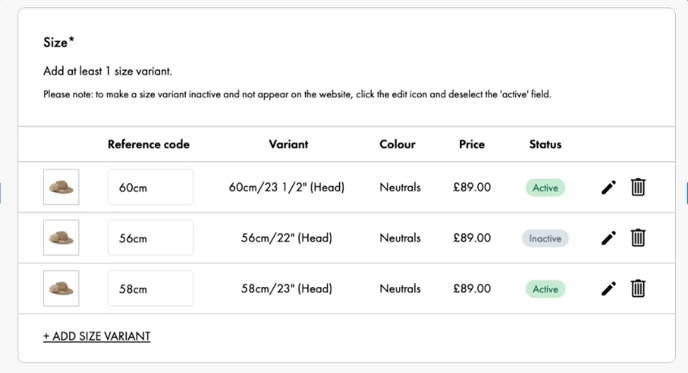
5. Click to 'Save Variant' as below:
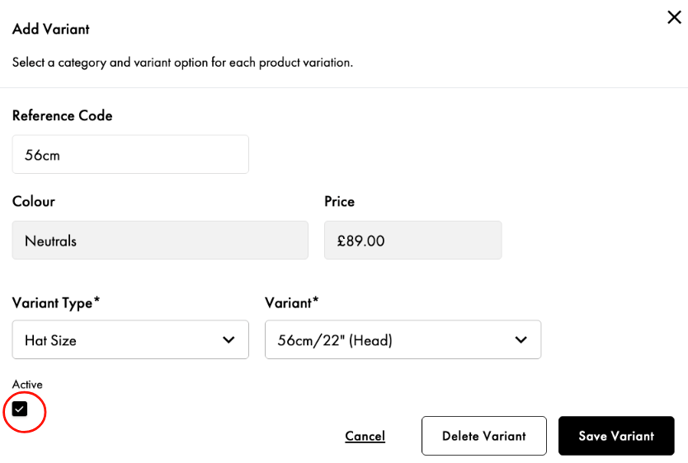
✅ Best Practices to Prevent Cancellations
-
Link your Shopify store to W&B and monitor sync health regularly.
-
Conduct regular stock takes. Uncertain about your inventory? Use Holiday Mode immediately.
-
Deactivate discontinued products from W&B.
-
Communicate issues early—reach out to Brand Support if you experience challenges.
💬 Need Help?
We’re here to support you. If you’re unsure about anything or need help troubleshooting, don’t hesitate to contact our Brand Support team via the contact form.
Together, we can ensure the best possible experience for our customers and your brand.
High Declined Order rates can lead to your account being put on Holiday Mode and can be suspended in severe cases.