When is stock deducted from your inventory levels?
Stock will be withheld from your Shopify inventory and your Wolf & Badger inventory as soon as an order is placed, this is prior to the order being accepted on your dashboard.
What happens when an order is declined or cancelled?
If an order item is declined we automatically deactivate the variant, this is to prevent any additional declined orders and gives you the opportunity to update your stockYou will then need to review your stock for that item and once satisfied with the accuracy you can reactivate the variant. If you are Shopify integrated, then use this guide to troubleshoot your Shopify stock.
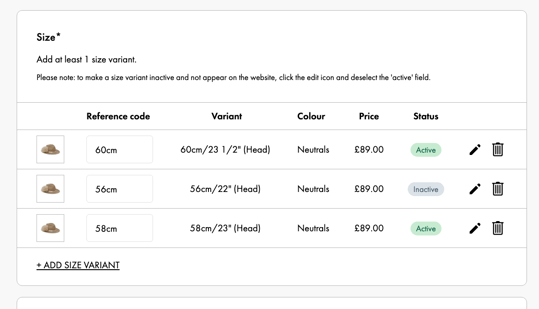
To reactivate the variant: Go to Products and select the product you wish to update, click 'Edit Product', go to the size section (see below) and click the edit pen to reactivate the variant.
- When a brand declines an item in an order before they've accepted it, the system restores that item's stock
- When a brand declines an item in an order after they've accepted it, the system does not restore that item's stock
- When a brand says the decline reason is "Sold Out/Out of Stock" for an item we do not reduce the stock to zero. (This applies to both Shopify-linked and non-Shopify-linked products.)
- If an item is declined by a brand but we have the item available in one of our stores we will fulfil it
What happens when an item is returned?
- Once a return is accepted the stock will subsequently be adjusted
- If a return is disputed the stock will not repopulate until there is a resolution -> more info on disputed returns here
- If the disputed return is accepted the stock will not repopulate
- However, if the disputed return is cancelled the stock will repopulate
Note: If returns are not accepted or disputed, they will automatically be moved to 'complete' and your stock levels will subsequently be updated 🚨
What if I need to adjust my Shopify inventory levels?
Shopify inventory can also be manually adjusted (tampered) directly in the Shopify store, not in W&B's dashboard.
Helpful Guides: