To export orders to Shopify, you should enable the following Admin API Access Scopes with Shopify:
- write_draft_ orders
- read_draft_ orders
- write_orders
- read_orders
- write_customer (optional)
For steps on how to edit your updating your Shopify Admin API access scopes, please refer to this article.
How to enable
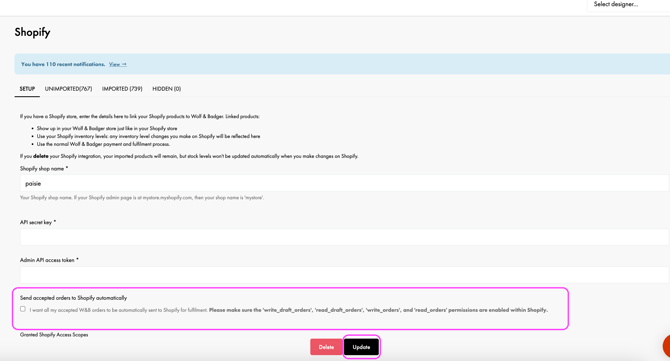
👉 Go to Dashboard → Shopify Setup tab (link) → Tick the box for sending accepted orders to Shopify → click Update
Demo video
Troubleshooting:
- For submitting the form in Setup, you'll need your API Secret Key and Admin API Access Token. These can be found in Shopify Home → Settings → Apps and sales channels → Your W&B App → API Credentials tab. The Admin API Access Token only appears when creating the app - you may need to uninstall and reinstall to retrieve it.
- Double-check your permissions if the feature doesn't work immediately (required permissions are listed on the Setup page)
What does the sync do?
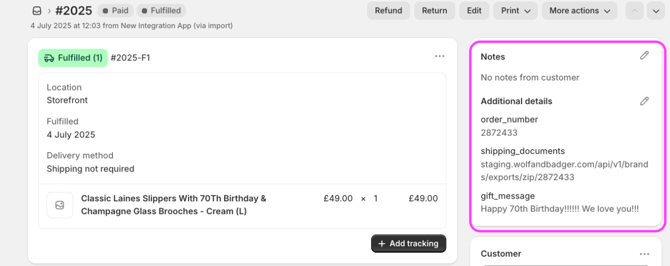
- Accepted Orders Automatically exported to Shopify, with a link to shipping documents included in the Order Notes section (copyable for browser access)
- Gift Notes If a customer includes a gift message, the order will be tagged in Shopify’s summary view, with the note also added to the Order Notes
- W&B Order Number Displayed in Shopify’s Order Notes. For cross-referencing, the Shopify Order ID also appears in the W&B dashboard order summary
- Pricing Display The price shown in Shopify is the full product price. Any discounts applied in W&B are not reflected
- W&B Customer Placeholder If you've given the app 'write_customer' access then we will send a W&B Customer Object placeholder with email
What does the sync NOT do - these actions must still take place in the W&B Order Dashboard:
-
-
Declining orders
-
Syncing returns
- Bulk downloading of shipping documents
-
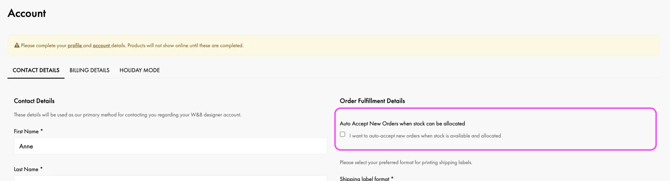
Want to go for a fully automated flow?
Working with a 3PL?
Enabling this feature can help facilitate collaboration with third-party logistics partners. Your warehouse team can access the Shopify Orders portal to process orders. However, please note the following requirements:
- Shipping documents must be accessed per order from within Shopify (bulk options remain on the dashboard itself)
- Users must be logged in to the W&B dashboard to access shipping doc links - for security reasons
Need a customer attached to your Shopify orders?
By default, orders we push to Shopify don't include a customer object or email address. If any of your apps or third-party tools require one to function, we can send placeholder customer data with each order instead.
To enable this, turn on the write_customer access scope for your Shopify app. Once enabled, we'll include placeholder customer data on every order we send.