When you set up your Shopify integration, we automatically pull stock from active locations that are online-enabled.
Please note that for your integration to work seamlessly, the stock should be held within a Shopify location directly and ideally not within a 3rd party stock management app, as the integration is currently limited in terms of being able to support these, especially if you have multiple sub-locations available.
If you have multiple Shopify stock locations and would like to only pull from one of these, you can choose the location by selecting: Stock Levels -> Shopify Locations
and select your preferred location (as below):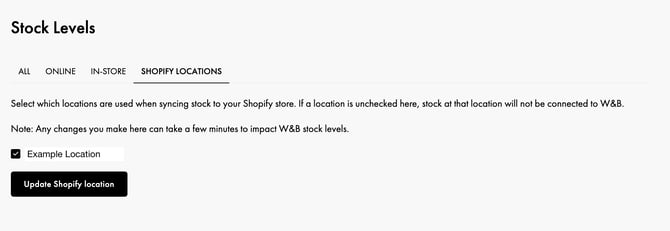
If you use multiple locations, remember to regularly refresh stock level here to keep things accurate.
*Important: We allow the selection of multiple Shopify locations, however your fulfilment location will not adapt to the multiple locations, therefore we recommend you only select Shopify locations which match your fulfilment location to avoid any order complications.
If you have any further questions, reach out to the Brands Support team for further info.