What does the Integration do?
Import Shopify products into W&B -
- Allows you to import products and the product information (title, description, images, and pricing) from Shopify, creating size and colour variants in the process.
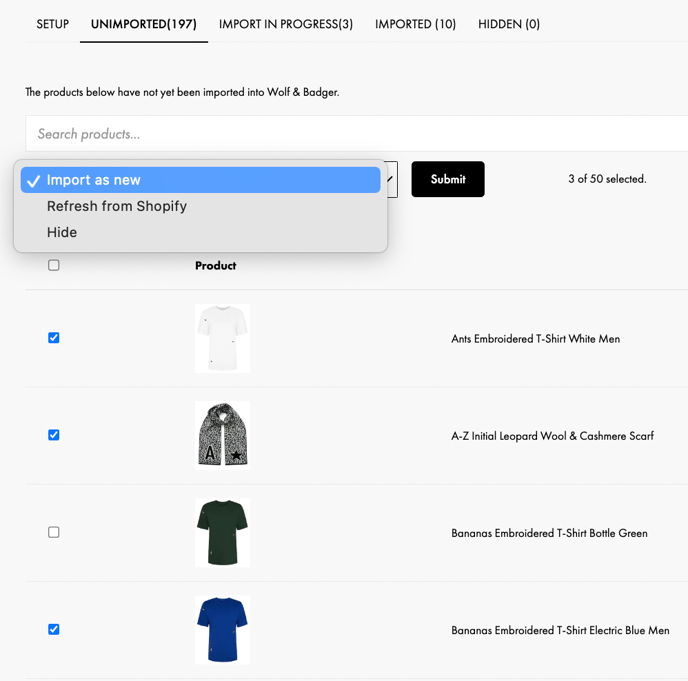
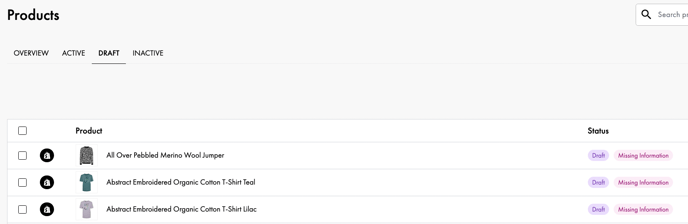
- When a product is imported from Shopify, a new Wolf & Badger product is created based on this information. You'll find newly imported products in the Draft section on the dashboard.
- The product price is copied from Shopify. If you'd like to manually amend the price, turn the Price sync enabled toggle off.
Once the product draft is completed and approved by our product approvals team, you can then link the Wolf & Badger product to Shopify price sync.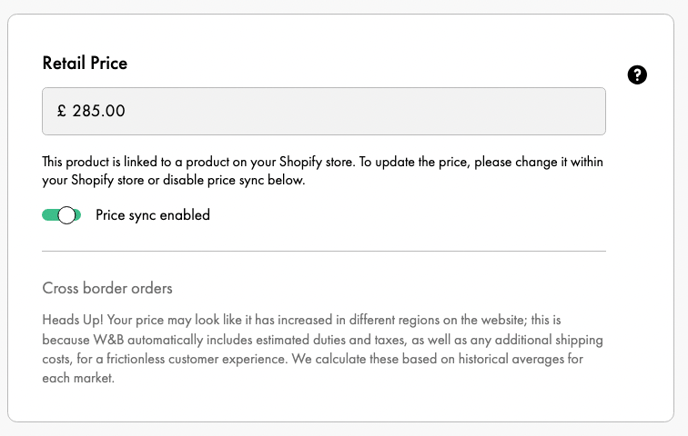
Please note that if your product is stocked in store, the price will remain locked so won't update online/in store- please contact us and we will be able to update the price for you. - Once an approved product is linked to Shopify stock sync, the inventory level updates are copied from Shopify and updated on the dashboard, and vice versa. For example, if you make a sale on your own site, the stock field on the Wolf & Badger dash & on Shopify will be updated to reflect this (-1 unit).
If a Wolf & Badger order is returned, the stock field on the Wolf & Badger dash & on Shopify will be updated to reflect this (+1 unit). - You may also choose whether to sync price, inventory levels, or neither.
Some brands choose to use Shopify integration to only import their products.
- Create a price and/or inventory level link between an existing Wolf & Badger product and a Shopify product.
- Linked products will have their prices automatically updated on the W&B Brand Dashboard.
- Linked products will have their stock levels automatically updated on the W&B Brand Dashboard.
- Product price and inventory level changes are copied from Shopify and updated when they change on Shopify.
- For linked stock products, stock levels are updated on the Shopify store - Shopify will serve as the master stock. Wolf & Badger is notified whenever the stock level changes.
- When you accept an order on the W&B Brand Dashboard, the Shopify inventory automatically decreases.
- When you accept a return on the W&B Brand Dashboard, the Shopify inventory automatically increases.
- To note, if the Brand's stock levels are managed via an external integration, meaning the stock levels are managed via Shopify/pulled from Shopify, you cannot edit these stock levels on theW&B Brand Dashboard.
- You can enable our Shopify Order Export feature from the Setup tab in your Shopify section of the Dashboard.
- What the sync includes:
- Accepted Orders Automatically exported to Shopify, with a link to shipping documents included in the Order Notes section (copyable for browser access).
- Gift Notes If a customer includes a gift message, the order will be tagged in Shopify’s summary view, with the note also added to the Order Notes
- W&B Order Number Displayed in Shopify’s Order Notes. For cross-referencing, the Shopify Order ID also appears in the W&B order summary
- Pricing Display The price shown in Shopify is the full product price. Any discounts applied in W&B are not reflected
- What isn't yet supported - these actions must still take place in the W&B Order Dashboard:
-
Declining orders
-
Syncing returns
- Bulk downloading of shipping documents
- Note: If you use Shopify's Managed Markets add-on, the sync will not work.
-
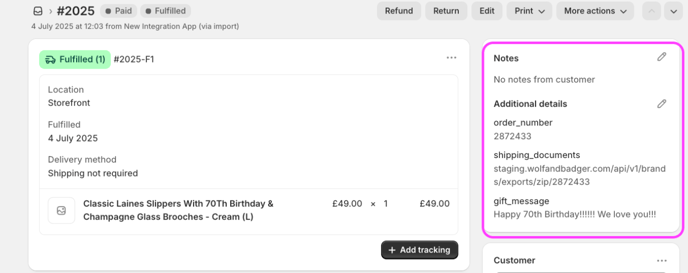
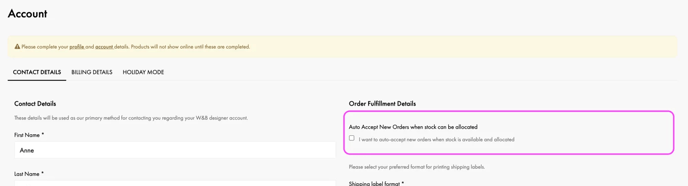
- If you'd like to try auto-accepting all orders, you can opt-in to this feature in your Account Settings. This way you can run a order fulfilment flow mainly outside of the W&B dash.
What does the integration not do?
Automatic product detail updates -
- When an update is made to a product in Shopify such as changing images, updating names or descriptions (excluding price or inventory level) these changes will not be reflected in the W&B Brand Dashboard.
- When importing or linking a product you will only be syncing price and stock levels.
- Pushing "refresh" will not make new product images show up on the W&B Brand Dashboard or customer site.
Wolf & Badger Products require additional product information -
-
- W&B has specific requirements for all Product fields and requires additional information to be added. All imported products will need additional information to be added before submission and appear on site, such as Care & Materials, Product Origin etc.
- Images - The integration pulls in photos from your Shopify, but you'll have the option to edit photos/add additional ones, as the requirement to have a ghost image as the first image applies to products imported from Shopify as well.
Adding multi-pack products -
- Currently, W&B does not support multi-pack products.
- Shopify lets you have a product listed multiple times at different prices, so if you've got your boxer briefs in 10 sizes, you can list a 6-pack and a 10-pack. Then a customer can buy a 6-pack of a particular size. When importing this type of product, you'll need to create two products: boxer briefs a 6 pack of boxer briefs and a 10 pack.