What is Retail Media?
Retail Media is a form of digital advertising where brands can run targeted ads on a retailer’s website using the retailer’s first-party data, this includes data such as browsing and purchase history. On Wolf & Badger, these ads will take the form of Sponsored Product Listings, which appear across relevant site placements with a “Featured” label to increase visibility. We are also working hard to enable Banner (Display) Ads in the future, but this is not currently available.
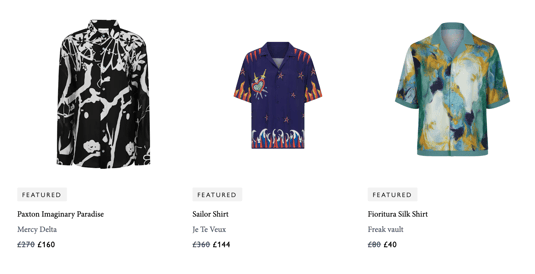
These Sponsored Listing placements run through an auction system, meaning different shoppers will see different featured products depending on relevance, available bidding, and customer browsing behaviour, ensuring your products are surfaced to the most interested shoppers while maximising your ad credit’s effectiveness.
- How can I get featured in Retail Media on Wolf & Badger?
If you’re not already part of the program, please reach out to the Brands Team via our contact form. We’ll issue an invoice and begin setting up your campaigns as of your next billing period.
- What is included in the retail media program? What will I get from it?
Once you have retail media credits, you will be able to spend on sponsored product listings within the Wolf & Badger site, helping increase your brand’s visibility and sales potential. You will get an opportunity to enroll your products in auctions and manage advertising campaigns for additional visibility on the Wolf & Badger platform.
- How do I see the performance of these campaigns?
You will have access to our retail media platform, Topsort, where you can view campaign performance, including impressions, clicks, spend and attributed sales generated through your retail media credits and any campaigns we run on your behalf.
- Will I have control over the ad spend or what is advertised?
Once you have set up your Topsort account, you will gain the ability to directly manage your campaigns, promoted products, and budget.
- Will I be charged extra if I want to spend more on retail media?
If you are interested in increasing your overall recurring monthly advertising investment to drive additional visibility and sales, please contact us, and we will be happy to discuss how we can support you with additional spend on your campaign .
- Can I add my own funds to promote products?
Yes, absolutely. You can top up your campaigns at any time. Simply let us know, and we’ll manage your balance within Topsort. We are also working on a self-serve top up via Stripe (more info on this coming soon), through which you can link a credit card and directly top up your account balance.
- Where will my products be featured?
Retail Media placements currently appear in three areas of the site:
- Category pages - up to 6 featured placements per page
- Search results pages - up to 6 featured placements per page
- Product Display Pages- up to two sponsored slots on product pages, displayed beneath the “similar products” section. Out of the 10 products featured there, two will be Retail Media placements allocated via auction.
Because placements are auction-based, exact visibility varies for each shopper.
- Can I use my own campaign photography?
Sponsored product listings only use the product images from your existing listings, so lifestyle or campaign photography isn’t required. However, campaign imagery will become relevant when we introduce Banner Ads in the future.
- Does Retail Media allow cross-category promotions?
No. Ads are shown within the category a shopper is browsing to maintain a relevant and seamless shopping experience. For example, a shopper browsing dresses will only see dress ads, not lingerie.
- Do stock levels affect Retail Media?
Products with low stock are still eligible and can win auctions, so stock levels don’t directly impact eligibility. However, the Topsort algorithm optimises for shopper experience and performance. If low stock makes a purchase less likely, you may see reduced visibility. Out of stock products will not be eligible to enter auctions and, therefore, will not show.
Want to opt in? Reach out here and we'll be in touch with the next steps!