Before you start
Please see instructions on how to perform the Judge.me integration. You'll need:
- An active Shopify store connected to your Wolf & Badger account
- The Judge.me Reviews app installed in Shopify
Here's a video running through the steps below.
Step 1: Find your Judge.me Private API token
- Log in to your Shopify admin and open the Judge.me Reviews app
- Go to Settings
- Scroll down to Integrations
- In the top right, click View API token
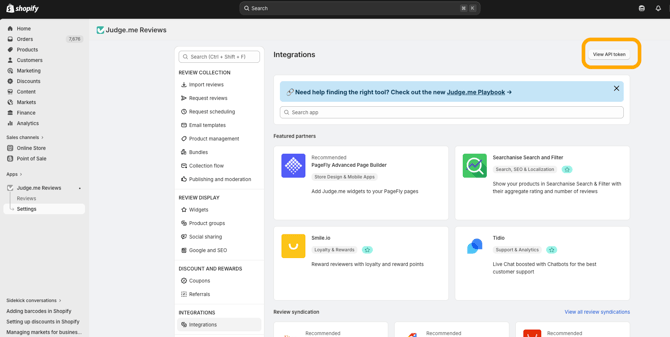
- Two tokens will appear - you need the Private API token (the bottom one)
- Copy it
Step 2: Connect your reviews in the Brand Dashboard
- Log in to your Wolf & Badger Brand Dashboard
- Go to Shopify > Settings
- Paste your Private API token into the input field
- Click Connect
The import takes a few seconds to complete. You'll see a confirmation notification in the bottom right of the screen when it's done.
What happens next
Your reviews will appear on your product pages within 24 hours.
Need help?
If you run into any issues, please contact the team via the Contact Us tab on your dashboard.