Once you've been approved for guarantees through the evidence submission process, select Edit Profile on your dashboard and then Sustainability Guarantees to add them to your brand profile.
Select only the guarantees you've been approved for.
Please read the description of each guarantee thoroughly, as they apply to your entire collection rather than to individual products.
Happy Worker and Independent Brand are mandatory for all brands. Beyond these two, you're welcome to hold as many of the optional guarantees as you qualify for, there's no limit.
Start video at 1:09 for sustainability guarantees information.
Please also ensure you can provide proof for any statements you agree to. We will be carrying out checks once the guarantees are live on the site, and if a product contradicts the claims of a guarantee, it will be removed from the site.
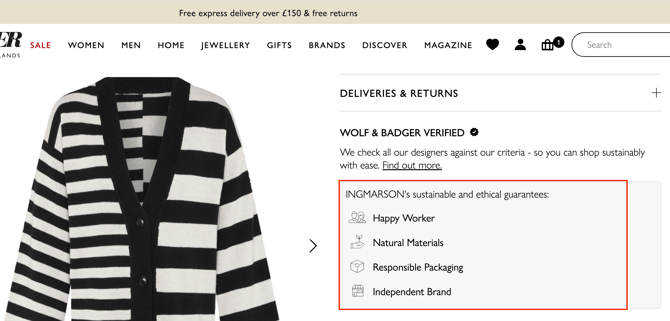
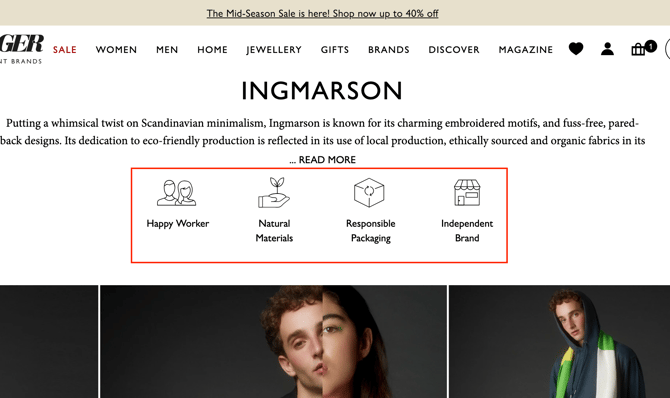
The guarantees will appear on your designer profile on the website under your brand biography, as well as on each product page. Customers are also able to filter their searches for products using these icons.
Where will I see the sustainability guarantees on my profile?
The guarantees appear on your brand page on the website (where your entire collection sits) and also on each individual product page.
It's important to note that your guarantees apply to your entire collection, which is why these guarantees are reflected in icons on both your brand page and each individual product page.
Where to find the guarantees on your brand profile
Where to find guarantees on product listings