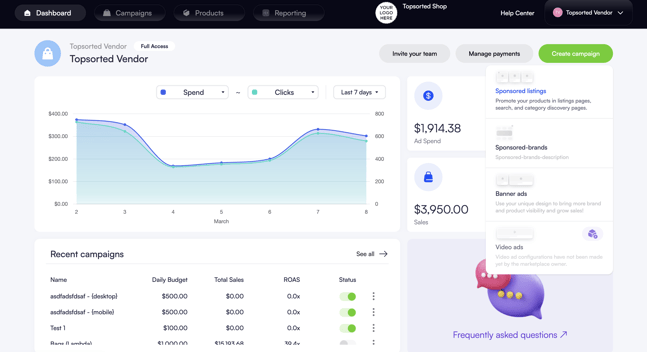
1. Click on the "Create Campaign" button at the top right of your dashboard and choose "Sponsored Listings" from the dropdown menu.
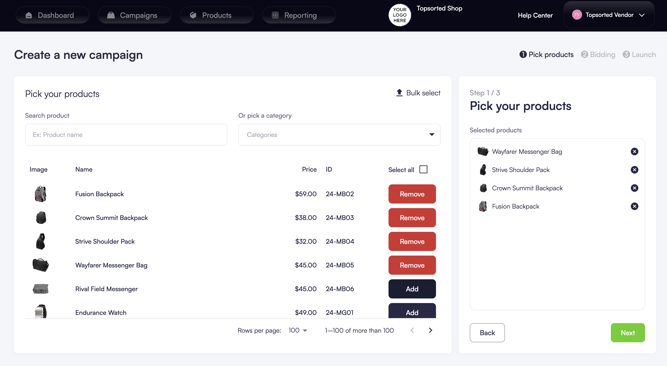
2. Select the products that you wish to include in the campaign.
3. Use the filters as required to search for products or select categories. It's also possible to upload a bulk list of products.
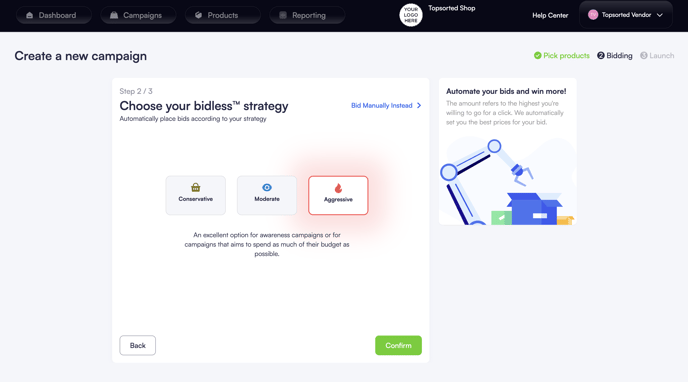
4. Set bid prices or enable BIDLESS™ autobidding to let Topsort's core technology do the work for you. This will dynamically select the best bids for you and maximize results.
Topsort offers three core strategies for your campaigns: Aggressive, Moderate, and Conservative.
-
Moderate: This is the balanced option, aiming to achieve the target ROAS set by the marketplace, which should reflect your average goal across campaigns. The Moderate strategy will aim for a high ROAS, providing a steady and controlled approach to your ad spend and returns.
-
Aggressive: Opting for an Aggressive strategy means aiming for higher overall sales at the cost of a lower ROAS. This strategy is designed to increase your ad’s visibility by entering more auctions, even if the predicted conversion rates are lower. It’s ideal for situations where your goal is to maximize exposure, clear stock, or promote a new product, especially during high-traffic events like Black Friday.
-
Conservative: The Conservative strategy is the opposite of Aggressive. It targets a higher ROAS by entering fewer auctions, but only those with a high likelihood of conversion. This approach suits well-established products where maintaining profitability is more crucial than expanding visibility or volume of sales.
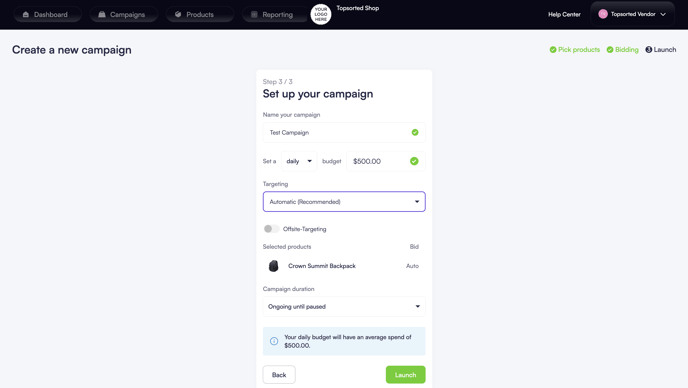
5. Set a name for your campaign, specify the budget, targeting and duration, and then launch the campaign.
You're all set!